Showing posts with label Technology. Show all posts

July 17, 2021

Penpalling with Global Penfriends


My oldest studied Greek as a language this past school year. (At first he used Rosetta Stone, and later, Duolingo. But that's a story for another day.) In looking for ways to enrich that learning, we looked around for ways to connect with the Greek culture and he really liked the idea of having a penpal. Turns out there are a number of sites out there with the aim of connecting international penpals. We found the site Global Penfriends and we've had a good experience with it!

Through Global Penfriends, you can search for penpals by country and by age range. When W searched for kids ages 8 - 12 from Greece, a few profiles popped up. The way the site works is you send a brief message to see if the person would like to connect. After a couple attempts that didn't yield responses, W heard back from a boy his same age from Athens back in April and they have been writing back and forth ever since! At first, W was so excited each time he received a new message and he would sit down immediately to write back. The novelty has worn off and he usually lets a week or so pass between correspondences now, but it has been fun to see their relationship continuing through the summer. Shortly after connecting with the boy from Greece, W received a message from a boy in Germany looking for a penpal with whom to practice his English. W was compelled by some of that boy's similar interests so he has been writing with him as well. He is going on over three months writing with these two different kids he's never met.

They write about the usual penpal topics you might expect of an 11-year-old: favorite sports, instruments they play, video games, school, birthdays, weekend plans, climate, holidays. But there have been some special communications W has really appreciated as well. When W was trying to plan some Greek food to cook this spring, he researched a lot of ideas but couldn't decide, so he asked his Greek penpal, E, about his favorite traditional foods. E's personal opinions greatly influenced W's decisions on what to cook.

His global awareness has grown a bit through having international penpals. 

W comments a lot about how impressed he is with his penpals' English. It makes W smile when they (rarely) write a sentence with the verb tenses a little off or words missing (and the mistakes help him guess in what ways their languages work differently), but the main sentiment is awe that kids his own age from abroad are conversing in a foreign language with ease.

Almost every single time W receives a note and replies, I see him Googling Celsius/Fahrenheit conversions, or getting out the ruler to compare centimeters to inches. He does this not only to understand facts his penpals have told him, but he also chooses to try to write in these terms himself, trying to tell them how cold it was here last winter in Celsius and how much snow we receive in centimeters. Since W can't speak fluent Greek or German, using those systems of measurement is one of the ways he can make an effort to reach across the cultural divide. 

He had to learn what his penpals mean when they talk about how they spend their "holidays," and what his German friend was referring to when he said football was his favorite, and how the 24-hour clock works.

International or not, letter writing or emailing is a chance to practice writing of course. It's also just a nice at-your-own-pace way to practice relationship/conversational skills-- like the balance between sharing stories about yourself and authentically responding or asking questions about the other person. There have been a few times, when W has me check over one of his notes before he sends it, that I've suggested he do a little more of one or the other.

Because we don't actually know the people on the other end of the emails, using Global Penfriends has been a great natural way to talk about and practice internet safety as well:
  • All notifications from Global Penfriends come through my (parent) email address.
  • W corresponds with his penpals through the site and we didn't have to exchange any other contact info or even full names.
  • I read every letter W sends and receives.
  • When one of his penpals shares a link, W knows to ask us whether he can click on it.
  • When he does a Google search to better understand something his penpal has written about (and any time he does online research for any reason), we talk about how to look for trustworthy sites to visit and read. 
Originally we set out to find a penpal to enrich a foreign language study. But it's been a lot more than that. My favorite moment was a few weeks ago when W said, "If I ever go to Greece, it'd be really cool if I could actually meet him." We're a long way from that day, but I like that we've expanded his horizons far enough to think about that. :) 

August 24, 2020

Keyboarding with TypingClub


When I set out to plan my first year of homeschool last year with a fourth grader, I didn't feel clueless about what had to be taught or learned. I had a sense for the upper grades and was on top of reading, writing, math, and even science and social studies and spelling. But something that was not so much on my radar was the need to learn keyboarding skills...

When W drafted an essay or a story or other piece of writing, I had him write with pen on paper, because I felt it was important to work on his handwriting and his stamina for the physical aspects of writing. But from time to time he would "type up" a finished, polished piece of writing, and it would take forever. I would have him work on it for fifteen- or twenty-minute chunks of time here and there and it felt like it took weeks to get an essay, not to mention something longer, typed. At one point I informally calculated his typing rate and found he was typing somewhere between one and two words per minute (WPM). Yikes. So then I tried to make a little more of a point of finding times for him to type, and I complimented him when it seemed his rate was getting fractionally better. He said he'd been taught about the "home row" in school, so I thought just reminding him of this fundamental principle of efficient typing would be enough. (When I was not much older than he is, my grandmother, one of the first people I knew to own a computer, sat me down one day and told me about keeping my fingers on "A-S-D-F" and "Semi-L-K-J." Because I was so excited about being able to use her computer for any reason, that tip alone was the only keyboarding instruction I needed; I latched onto it and became pretty efficient pretty quickly.) But this single tip for typing was not helping W as much as I remembered it helping me. He wasn't truly basing his fingers anywhere in particular when he typed and he wasn't getting much quicker or developing the right habits simply by typing things more often. It was finally in the spring of his fourth-grade year that I realized that he needed more and I looked into an actual program that could explicitly teach him and give practice in the skills and habits he needed. We found TypingClub, an online program, and have been really happy with it ever since.

I didn't do extensive research, but I found that a lot of teachers online recommended TypingClub and when I did some quick comparisons with other programs, the fact that it was free helped tip the scales in its favor. (I figure we can always try a free service and decide we need more, rather than the other way around.) It truly was free (not just a limited free version that makes you compelled to buy the full version almost immediately). We clicked that we were a homeschool (but maybe it is free for classrooms as well up to a certain number of students) and gave a few bits of info and we had an account. W uses it several times a week for fifteen minutes or so at a time, and his typing has improved a lot-- as well as his attitude and confidence in regard to typing.


When he logs in each time, the home screen shows time spent in typing practice last week, this week, and today. It also shows current average speed, as well as last week's and last month's average speed, in WPM. He chooses any of the levels he's worked his way up to so far (there are more than 100 he can choose from at this point, focusing on specific keys or the whole keyboard). It tells him his speed and accuracy in real time as he types, but those settings can be turned off if distracting. It offers a few different modes for support-- for a while he had a picture of the keyboard toward the bottom of the screen and it lit up the location of each letter as he was to type it (even though even then he wasn't supposed to look at the actual keyboard). After a while, we switched the level of support so now it only shows two hands and lights up the finger that should type each letter, but doesn't show a keyboard or where the key is. Every once in a while a session is interspersed with a one-minute video discussing the importance of posture or looking away from the screen to give your eyes a rest. As he finishes any exercise he chooses, he gets an immediate score and a rating out of five stars (it's kind of like a video game in that way and is very motivating). He likes to try to earn five stars on a level where he had previously only earned three or four, and enjoys revisiting earlier levels when he needs an ego boost.

There are some ads sometimes on the side of the screen (naturally, they are for whatever it is we've been looking to buy recently, so W had a chance to learn the big brother aspect of online research).


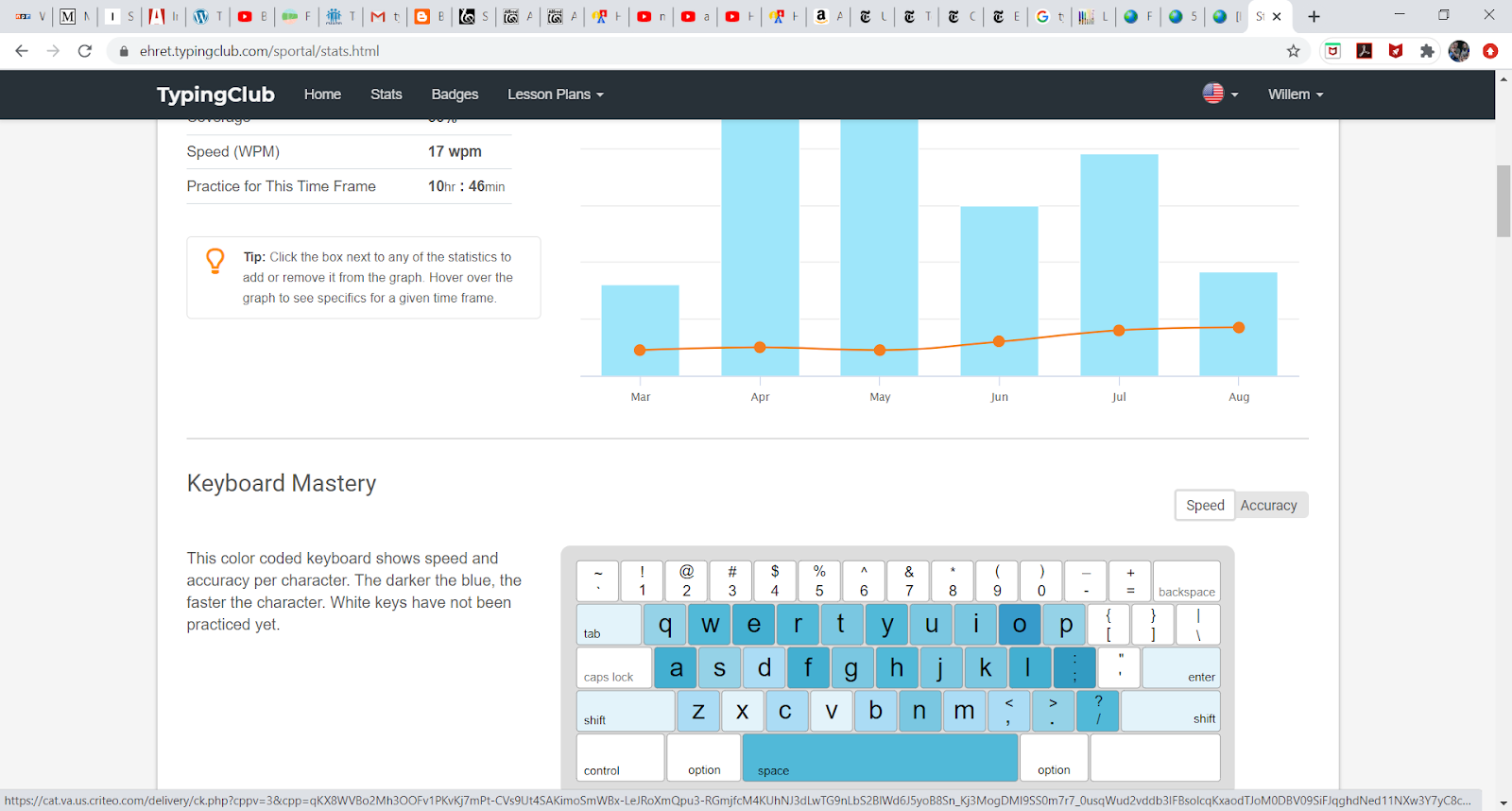
Beyond the screens he sees, if I want to, I can click "Stats" and see a surplus of statistics (more than I really need but it's nice to look at from time to time):
  • How well he has mastered individual keys 
  • How long he's practiced on which exact dates 
  • A graph of progress overview 
  • How fast and accurate each individual finger is 
  • Which character he's fastest (f), slowest (b), most accurate (f), and least accurate (w) at
From time to time, this stats page actually provides a great, concrete opportunity to sit and analyze his learning with him. He likes to pore over it and see the charts of his progress.

One thing the TypingClub lessons say repeatedly to the student is that the one rule is to not look at the keyboard. And yet. It's so hard not to when you are learning. Especially when you've made a mistake and want to be sure to find the correct key. Telling him not to look wasn't enough, so I used a trick I remembered learning in my student-teaching days-- a section of a cardboard box to cover the keyboard but allow student hands to fit beneath it. It feels a little mean, but this way they physically can't see the keyboard until they learn the habit of really not depending on looking. We transformed an old Kiwi Crate box for this purpose, adding fins on each side to raise the level of it off of the keyboard and it has worked great.


We've gotten well beyond the hunt-and-peck stage and I'm thankful for that; he's up to about a 20 WPM average these days. I think we'll keep up some regular keyboarding practice this year-- it certainly doesn't require a lot of dedication of time and I'd like him to get a little more efficient as a fifth grader (I've heard a rule of thumb of a goal of 5 WPM x grade level in school so that's the guideline we're using for now). Being able to type for real makes him feel grown up and he treats it almost like it's a party trick-- "Look, Dad, watch me type without looking!" I am optimistic that this year typing can become a helpful tool in his arsenal rather than a source of frustration.